WHY JOB SHOPS SWITCH
Keep the details of each job easy to find.
Custom orders may need different materials, processes and finishing steps. Phasio keeps your pricing rules, work orders and part history together, so you can find what happened when the part comes back for a reorder.
QUOTING
Price custom parts using your shop rates.
Upload STEP, IGES, SolidWorks (.SLDPRT), Parasolid (.x_t), STL or 3MF files. Phasio measures the part so your pricing rules can use its volume, dimensions, surface area and other geometry.

- Your equations. Write the logic once per process, with material, precision and lead-time options.
- Review when it matters. Parts that need a person are held for review, with price hidden and checkout blocked until you set it.
- Order-level pricing. Add minimum order fees, quantity discounts and shipping costs.
ORDERS
See where every order stands.
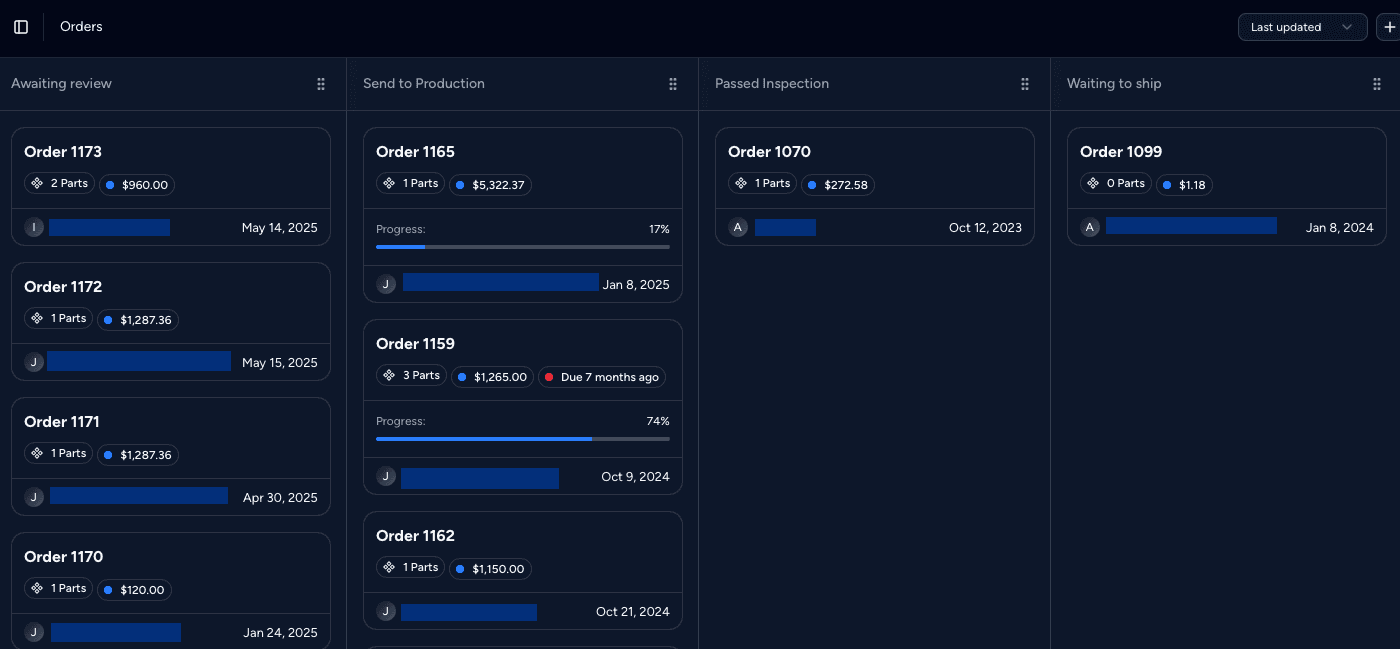
Accepted quotes appear on an orders board with the stages your shop uses. A status change can notify the customer, create a shipping label, open production scheduling or send an invoice.
- Your stages. Name the order stages to match how work moves through your shop.
- Tooling and setup. Add expenses for tooling or setup to any quote or order, at a fixed price or an hourly rate.
- Projects. Group related quotes and orders for one customer programme.
PRODUCTION
Work orders that follow each part.

Create work orders from the customer order, choose a routing and track parts through your shop operations. The production history stays with each part.
- Several runs per part. Split a part across work orders, each with its own routing and quantity.
- Dispatch dates from real durations. Phasio adds process, post-process and lead-time durations to estimate when each order ships.
- Scrap and replace. Record scrap with a reason and put replacements back into the same work order.
ALSO BUILT IN
Customer orders, payments and documents together.
Customer storefront
Let customers upload parts, get a price and order on your own branded site.
Customer catalogs
Save repeat parts per customer with fixed or automatic pricing for fast reorders.
Accounting sync
Send customers, quotes and invoices to QuickBooks, Xero, Zoho Books, Lexoffice or WeClapp.
Payments
Take card payments through Stripe or PayPal, or set payment terms for account customers.
Shipping labels
Create labels with 30+ carriers through Shippo when an order is ready.
Document templates
Brand your estimates, invoices and travellers, with your own number prefixes.
“Phasio lets us clearly track which projects are happening when, giving us a clear view over all our manufacturing processes. Our team has never felt so organised.”
IS PHASIO RIGHT FOR YOUR SHOP?
For shops making custom parts to order.
A good fit
Contract manufacturers, service bureaus and job shops that make custom parts to order across one or more processes.
Also a good fit
Shops with an ERP that want better quoting and shop-floor tracking, connected through the API.
Not the right fit
Make-to-stock manufacturers that need MRP, inventory planning and purchasing as the core of their system.
How to start
Start a Pro trial to set up quoting. Contact us to discuss Factory Floor for production tracking.
FREQUENTLY ASKED
Job shop software FAQ
What is job shop software?
Job shop software helps a make-to-order manufacturer quote custom parts, manage orders, plan production and send invoices. Phasio keeps the quote, order and part history connected.
Is Phasio an ERP?
No. Phasio handles quoting, customer orders and production tracking. It connects to accounting systems such as QuickBooks and Xero, and you can use its API to share data with an ERP.
Which processes can I quote?
Any process you can describe with a pricing equation. Shops use Phasio for CNC machining, 3D printing, injection molding, casting, finishing and their own custom processes.
Which CAD files does Phasio accept?
Phasio accepts STEP, IGES, SolidWorks part files (.SLDPRT), Parasolid files (.x_t), STL and 3MF. It measures uploaded parts for use in your pricing rules.
Can customers order from us online?
Yes. The storefront lets customers upload parts, get a price and pay by card, or send a request without payment. You can embed it on your own website.
How long does setup take?
Start with one process and one part. The pricing guides show how to set up your rates for common processes. Contact us if you also need Factory Floor.
KEEP READING