WHY A MANUFACTURING CRM
Have the last job in front of you when a customer calls.
For a reorder, you need the part revision, the last price and any notes from the previous job. Phasio keeps that history easy for your team to find.
ORDER STAGES
Use the order stages your shop already knows.
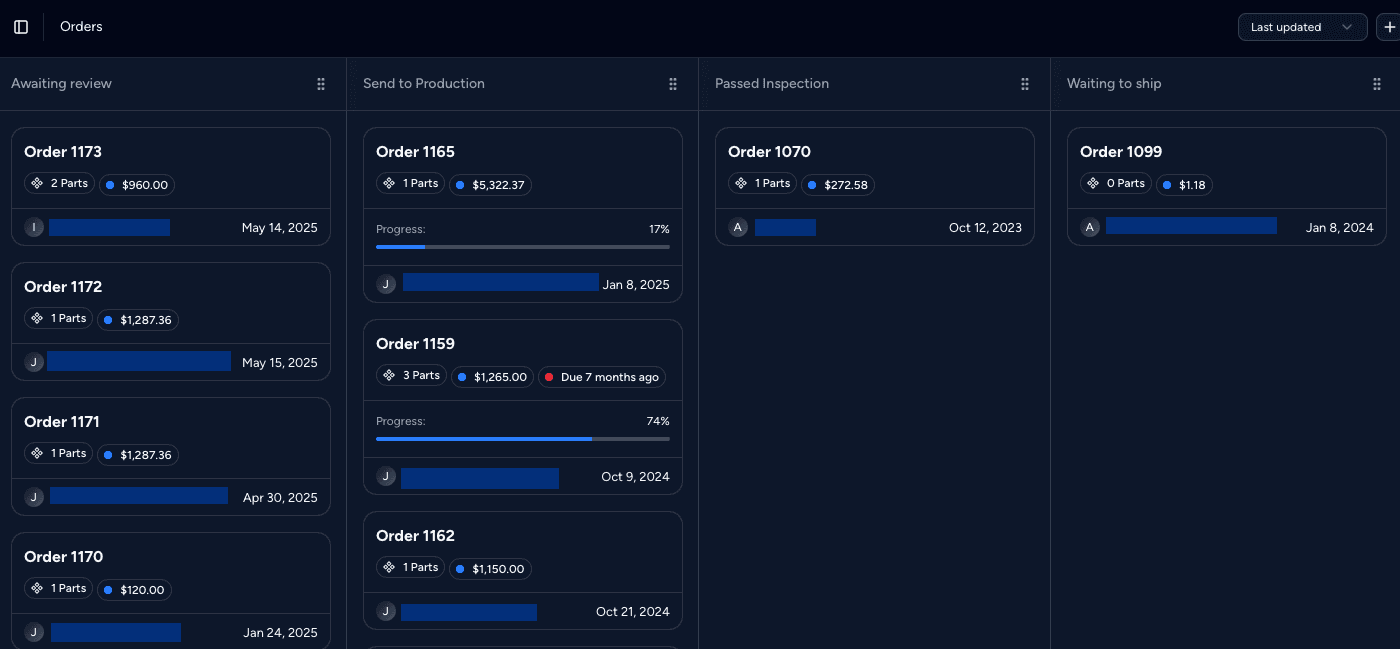
Set up the columns your team uses and move jobs between them. A status change can send the customer an update, order confirmation or invoice.
- Your stages. Name and arrange the columns to match how your shop handles orders.
- Stage automations. Notify the customer of the new status, send an order confirmation or send the invoice.
- Owners. Give each quote or order an owner, so everyone knows who follows it up.
HISTORY
Find the messages and changes behind a job.
The activity timeline brings together messages, file uploads, quote decisions, shipping updates and price changes for a project.
- Rejections with reasons. See who rejected a quote and the message they left.
- Price changes logged. Order edits record the previous price and the new one.

- Comments on parts. Discuss a part on its 3D model, so the question stays with the right design.
ACCOUNTS
Keep each customer’s prices and terms on file.

Each customer organisation can have its own contacts, pricing equations, material rates, payment terms and a catalog of repeat parts at agreed prices.
- Customer catalogs. Save repeat parts so customers reorder in a few clicks.
- Fixed part prices. Set an agreed price per part that overrides the automatic quote.
- Customer fields. Store details such as the customer’s ERP ID and use them in your documents.
ALSO BUILT IN
Give customers a clearer way to order again.
Customer portal
Customers log in by email or phone to see quotes, orders and their catalog.
Branded storefront
New customers upload parts and get a price on your own website.
Quote and order reporting
See how many quotes become orders and how customers use your storefront.
Customer notifications
Customers choose email, SMS or WhatsApp for updates.
Bulk import
Upload your existing customer list from a spreadsheet.
Accounting sync
Customers and invoices sync with QuickBooks, Xero, Zoho Books, Lexoffice or WeClapp.
“It was a breakthrough for our company to use Phasio software. Customer experience increased to a totally new level while we could reduce our handling fees and increase our productivity.”
IS PHASIO THE RIGHT CRM FOR YOU?
For shops that work with repeat customers.
A good fit
Contract manufacturers whose sales process runs through quotes, repeat orders and key accounts.
Also a good fit
Shops that use a spreadsheet or a generic CRM today and re-type every order into another system.
Not the right fit
Teams that need outbound prospecting, lead scoring or email sequences. Phasio manages customers and jobs, not cold leads.
Works alongside
Keep your sales CRM for prospecting and connect it to Phasio when a lead becomes a customer.
FREQUENTLY ASKED
Manufacturing CRM FAQ
What is a manufacturing CRM?
It helps your team manage customers along with their quotes, parts and orders. In Phasio, you can assign owners, follow order stages and review the history of each job.
Can I track quotes and orders through my own stages?
Phasio tracks quotes and orders through stages you define. Status changes can notify the customer, send an order confirmation or send an invoice.
Can I replace HubSpot or Salesforce with Phasio?
Phasio covers customer quotes, orders and follow-up. If your team uses HubSpot or Salesforce for prospecting, lead scoring or email campaigns, keep it for that work and connect it to Phasio through the API.
Can different customers have different prices?
Yes. Each customer can have its own pricing equations, material and post-process rates, payment terms and fixed prices for repeat parts.
Can customers see their own orders?
Yes. The customer portal shows their quotes, orders and catalog, and you can embed it on your own website.
How do I move my customers into Phasio?
Upload them from an Excel file, or sync them from your accounting system.
KEEP READING